SpringBoot와 Redis 연결
✒️ 2026-07-02 23:21 내용 수정
실습 참고 자료
- 인프런의 lettuce를 이용하여 redis 다루어 보기(저자: 신현호) 강의 내용을 참고하여 진행하였다.
- Redis CRUD까지의 자료는 Spring Boot - CRUD Operations Using Redis Database 참고.
SpringBoot에 의존성 추가
- SpringBoot 의존성 파일에 Spring Data Redis를 추가한다.
- 해당 의존성에는 Java로 Redis를 관리하기 위한 클라이언트인 Lettuce가 포함되어 있다.
- 참고 자료 : Spring Boot Data Redis 환경 구성 및 활용하기
<!-- maven 의존성 -->
<dependency>
    <groupId>org.springframework.boot</groupId>
    <artifactId>spring-boot-starter-data-redis</artifactId>
</dependency>
연결을 위한 테스트 클래스 작성
- Redis 연결을 위한 호스트, 포트, 데이터베이스, connection 클래스를 설정한다.
- 프로젝트의
test패키지 내에 생성한다.
package myproject.redis.lettuce.string;

import io.lettuce.core.RedisClient;
import io.lettuce.core.RedisURI;
import io.lettuce.core.api.StatefulRedisConnection;
import io.lettuce.core.api.sync.RedisCommands;
import org.junit.jupiter.api.Test;

public class RedisLettuceString {
    @Test
    public void setGet() {
        // host 주소
        String host = "localhost";

        // Redis 연결 주소 생성
        RedisURI redisURI = RedisURI.builder()
                .withHost(host)
                .withPort(6379) // 포트 번호. Docker에서 설정한 값과 동일하게 설정
                .withDatabase(0) // 0 - 15까지 존재
                .build();

        // Redis 클라이언트 생성
        RedisClient redisClient = RedisClient.create(redisURI);

        // Connection 연결
        StatefulRedisConnection<String, String> connection = redisClient.connect();

        // Redis 명령어
        RedisCommands<String, String> redisCommands = connection.sync();

        // Redis 연결 테스트를 위한 Key-value
        String key = "lettuce:string";
        String value = "hello";

        // Redis에 Key-value 저장
        redisCommands.set(key, value);

        // 저장된 Key로 value 확인
        String get = redisCommands.get(key);
        System.out.println("get = " + get);

        // DB 사용이 완료되면 connection을 끊고 Client도 종료한다.
        connection.close();
		redisClient.shutdown();
    }
}
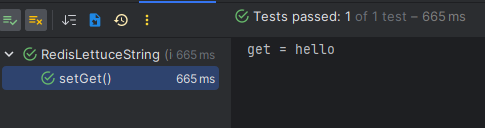
RedisConnectionFactory로 연결 시
- Redis Client는 Redis 서버와 socket을 연결하고 데이터를 읽고 쓰는 로우 레벨 라이브러리다.
public class testConnect() {
	// Redis 연결 주소 생성
	RedisURI redisURI = RedisURI.builder()
			.withHost("localhost")
			.withPort(6379) // 포트 번호. Docker에서 설정한 값과 동일하게 설정
			.withDatabase(0) // 0 - 15까지 존재
			.build();

	// Redis 클라이언트 생성
	RedisClient redisClient = RedisClient.create(redisURI);

	// Connection 연결
	StatefulRedisConnection<String, String> connection = redisClient.connect();

	// Redis 명령어
	RedisCommands<String, String> redisCommands = connection.sync();

	// 이후 데이터 처리 동작 실행

	// DB 사용이 완료되면 connection을 끊고 Client도 종료한다.
	connection.close();
	redisClient.shutdown();
}
- RedisConnectionFactory는 Spring Data Redis에서 제공하는 인터페이스로, Redis Client를 사용하여 서버와 연결을 생성 및 관리한다.
- 사용하는 Redis Client 종류에 따라
LettuceConnectionFactory나JedisConnectionFactory를 사용한다.
- 사용하는 Redis Client 종류에 따라
import org.springframework.beans.factory.annotation.Value;
import org.springframework.context.annotation.Bean;
import org.springframework.context.annotation.Configuration;
import org.springframework.data.redis.connection.RedisConnectionFactory;
import org.springframework.data.redis.connection.lettuce.LettuceConnectionFactory;
import org.springframework.data.redis.core.RedisTemplate;
import org.springframework.data.redis.repository.configuration.EnableRedisRepositories;
import org.springframework.data.redis.serializer.GenericJackson2JsonRedisSerializer;
import org.springframework.data.redis.serializer.StringRedisSerializer;

@Configuration
@EnableRedisRepositories
public class RedisConfig {
    @Value("${spring.data.redis.host}")
    private String host;

    @Value("${spring.data.redis.port}")
    private Integer port;

    @Bean
    public RedisConnectionFactory connectionFactory() {
        return new LettuceConnectionFactory(host, port);
    }

    /**
     * Redis 고유 자료구조와 기능 제어 시 사용
     */
    @Bean
    public RedisTemplate<String, Object> redisTemplate() {
        RedisTemplate<String, Object> template = new RedisTemplate<>();

        template.setConnectionFactory(connectionFactory());
        template.setKeySerializer(new StringRedisSerializer());
        template.setValueSerializer(new GenericJackson2JsonRedisSerializer());
        template.setHashKeySerializer(new StringRedisSerializer());
        template.setHashValueSerializer(new GenericJackson2JsonRedisSerializer());

        template.afterPropertiesSet();

        return template;
    }
}
Redis Template을 사용할 경우
- Redis의 고유한 자료구조(Data Structure)와 특정 기능을 정밀하게 제어해야 할 때 사용한다.
- 주요 용도: 장바구니(Hash), 최근 검색어(List), 실시간 랭킹(Sorted Set), 중복 클릭 방지(Set), 분산 락(String)
- 장점: Redis가 제공하는 모든 명령어(원자적 연산, TTL 직접 갱신 등) 활용 가능.
- 단점: 로우레벨 코드가 늘어나며, 직렬화/역직렬화 설정을 직접 신경 써야 함.(
setSKeyerializer()등을 추가해야 함)
Redis Repository를 사용할 경우
- Spring Data JPA와 사용법이 유사하여 객체(Entity) 중심의 CRUD를 빠르게 구현할 때 사용한다.
- 주요 용도: 세션 관리, 유저 토큰 저장, 단순 객체 캐싱
- 장점:
@Id,@TimeToLive어노테이션으로 만료 시간 및 Key 생성을 선언적으로 처리 가능. - 단점: Redis의 다양한 데이터 구조(Set, Hash, Sorted Set 등)를 세밀하게 제어하기 어렵고, 대량 데이터 처리 시 성능이 떨어질 수 있음.